
 and
and 

GNSS coordinate systems explained

Table of contents
When should you care about coordinate systems, and when not?
You do NOT need to think about coordinate systems if the task is only about relative coordinates like:
- Robot navigate using relative coordinates like move 5 meters East
- Tractor must drive through a field and have pass-to-pass centimeter accuracy
- drone just needs to “return to the take-off point.
- Comparing points recorded by the same receiver, without linking to maps (checking if a tractor returned to the same spot in the field).
You DO need to care about coordinate systems if the task involves comparing GNSS measurements with third-party maps, GIS, or official documentation:
- Geodesy, cadastre, land surveying like you measure land boundaries and want to compare them with a cadastral map.
- Combining GNSS data taken with maps prepared by third party supplies or with the measurement which your college took with another kit.
- Sharing positioning data with third parties (such as cadastral authorities or contractors), for example when you provide coordinates of a planned digging location to a contractor who will use their own RTK equipment to locate the exact point in the field based on your map
If this is your case, continue reading — coordinate systems now matter for you.
Coordinate systems explained
One of the most common reasons for faulty data in the field is mismatched coordinate systems—between your rover, base, or NTRIP service.
To avoid costly mistakes, it’s important to understand how coordinate systems work and how each part of your GNSS setup contributes to the final position.
Datums
When you measure something, you always need a starting point, or “zero.” If two people don’t use the same starting point, their measurements can’t be compared. The same is true for positions on Earth.
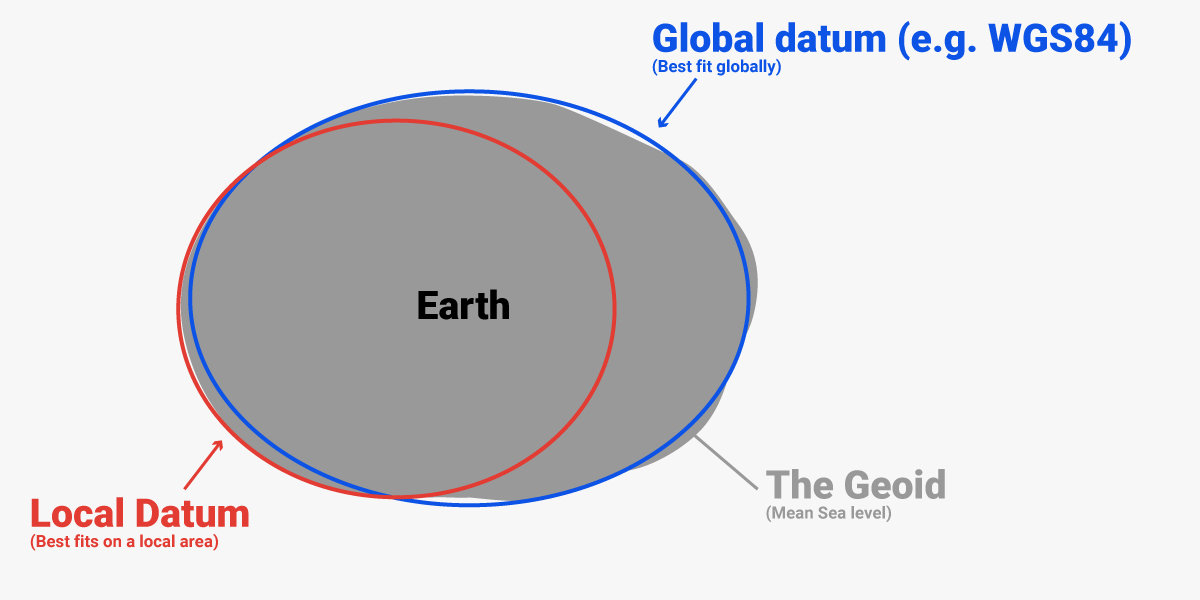
Because the Earth is not a perfect sphere, geodesy uses an ellipsoid as a simple model of the Earth. A datum defines this ellipsoid, its position relative to the Earth’s center, and how latitude, longitude, and height are measured.
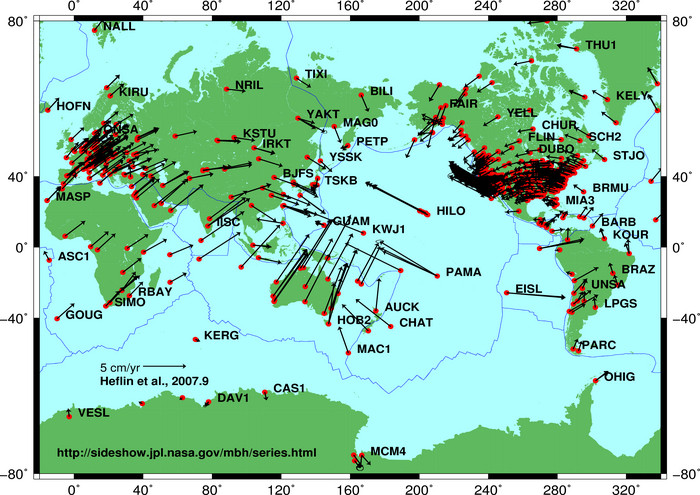
- Global datums cover the whole planet and are used by GPS/GNSS. They get updated over time as measurements improve. But global datums are tied to the Earth’s center, so coordinates slowly change as tectonic plates move (about 10 cm per year). A point you measure today won’t have the exact same coordinates in 10 years.
Examples: WGS84, ITRF. - Local datums fix coordinates to one tectonic plate, region, or country. Everything on that plate moves together, so coordinates stay stable over time.
Examples: GDA94 (Australia), NAD83 (North America), ETRS89 (Europe).
Datums can also be:
- Static: coordinates don’t change with time. If there is little or no tectonic activity and movements of earth year over year are negligible.
Examples: ETRS89 used in Europe.
- Dynamic: coordinates update constantly as the Earth moves. Global datums are typically dynamic and updated multiple times per year because the continents drift relative to each other.
Examples: WGS84, ITRF, IGS.
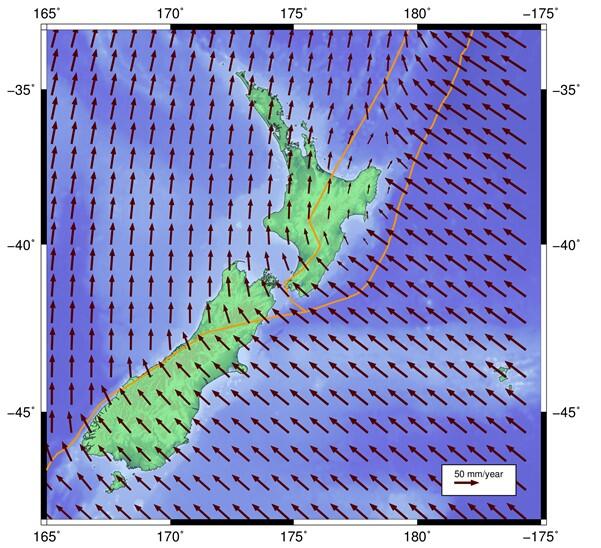
- Semi-dynamic: coordinates update after deformation events, like earthquakes, or every few years. Local regional/national datums in countries where there is tectonic activity are usually Semi-dynamic.
Examples: NAD83(2011) used in USA, GDA2020 used in Australia.
Epochs
For dynamic and semi-dynamic datums, you also need to know the date/time when the position was measured, because position depends on time as well as X, Y, Z.
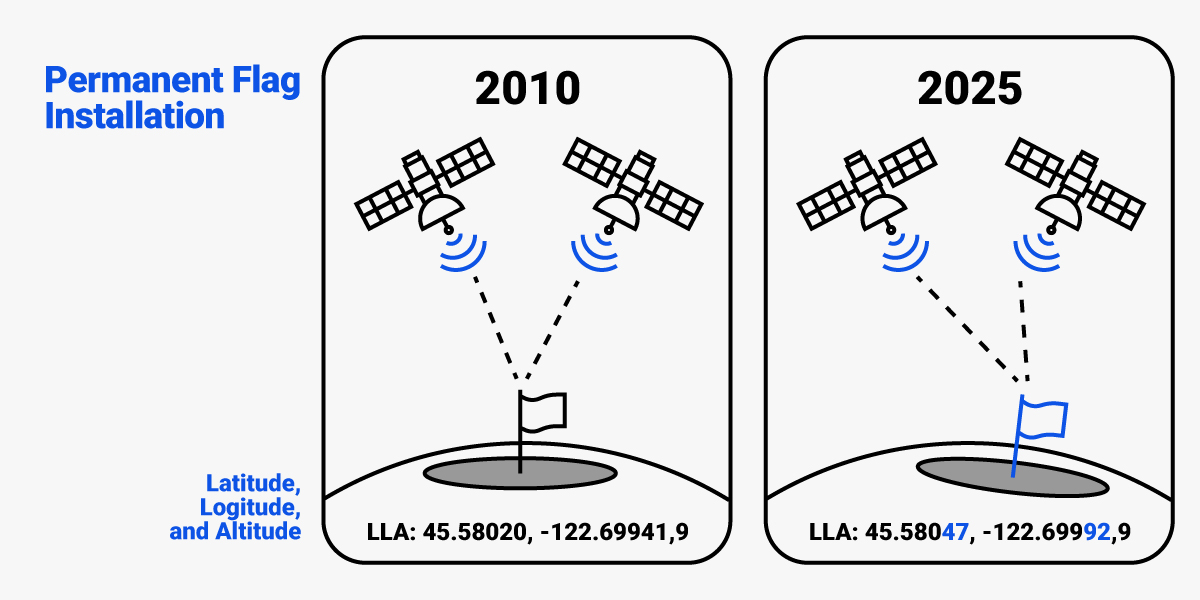
For example, the proper name of the latest horizontal datum used in the United States is NAD83 (2011) Epoch 2010.00 or NAD83 (2011) Epoch 2025.00
When you combine the datum (the “where”) and the epoch (the “when”), you get what geodesy calls the reference frame. If you compare your measurements with an existing map or dataset, always make sure they use the same reference frame (datum and epoch) — otherwise, positions may not match correctly.
Projections
A projection is a mathematical method to draw the curved Earth on a flat map (2D). This is needed because latitude/longitude are not convenient for distances, angles, or CAD work.
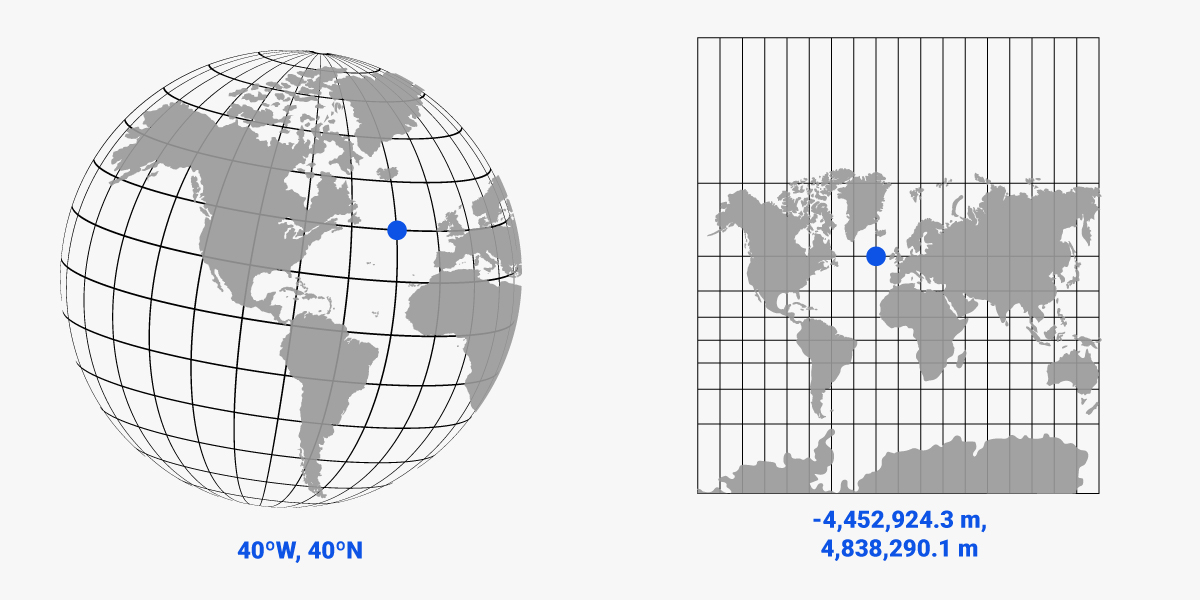
While geographic coordinate system collects ellipsoid, geoid, and datum information, indicating where something is in 3D space, the projected coordinate system contains the coordinate system information plus more details like the mathematical model of the projection.
Examples of map projections:
- UTM (Universal Transverse Mercator) is the most common projection for GNSS, mapping, and surveying. For example, UTM Zone 32N is used in central Europe.
- Web Mercator is the projection used by Google Maps, OpenStreetMap, and other online map services.
Datum transformations
The same location on Earth can have different coordinates depending on the Datum used:
- Standalone GNSS receivers (without RTK corrections) provide position in global WGS84/ITRF Datum.
- RTK receivers provide position in the Datum at which the base station / NTRIP correction service was calibrated.
If the Datum used by your GNSS receiver and the Datum you want the positions are not the same, you need a Datum transformation. Think of it like converting currencies: €100 is not the same as $100, but with the right exchange rate you can compare them. A datum transformation is just math that shifts, rotates, or scales coordinates in different Datums so they reflect the same physical point.
The four examples below cover the most common real-world scenarios where datum transformations come into play. Each example highlights what is happening, what problem appears, and how to fix it.
Typical use cases:
Working with maps and GNSS data that use different datums
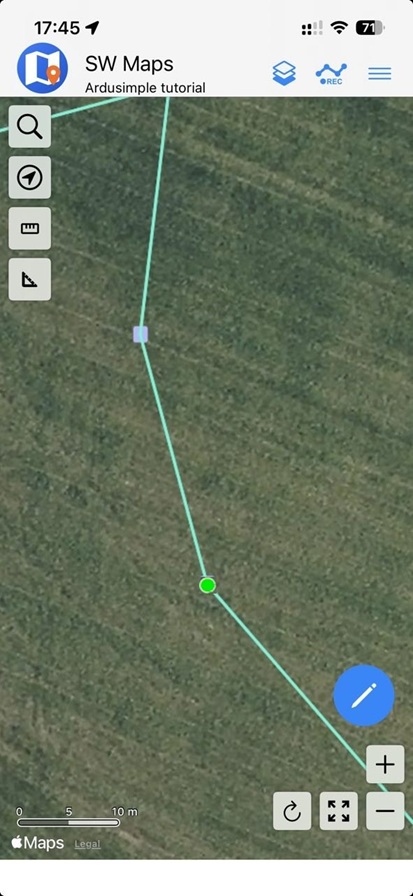
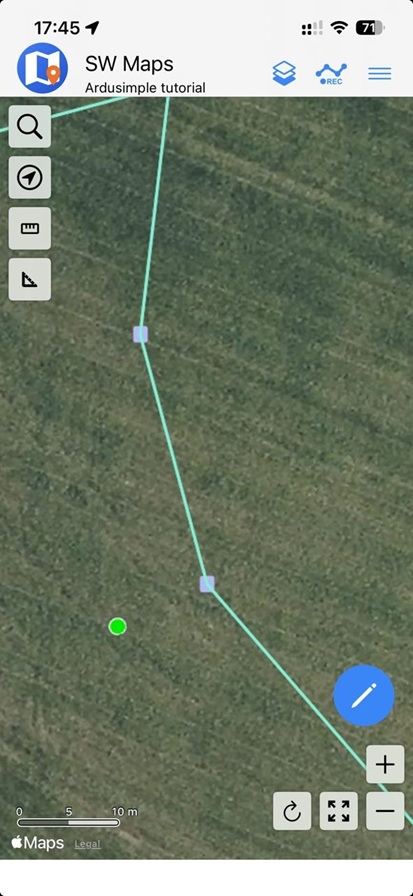
Imagine you’re preparing for fieldwork and load a map or background layer (for example, from Google Earth, OpenStreetMap, or a drone orthophoto) into an app like SW Maps. These sources almost always use the global datum WGS84, because it’s the standard for most web global maps.
Meanwhile, your RTK receiver is connected to a local NTRIP correction service like SAPOS, which provides RTK corrections in ETRS89 — the official geodetic reference for Germany and most of Europe.
Although WGS84 and ETRS89 are very similar, their reference origins differ by about 1–2 meters in Europe. So, when you overlay your WGS84 map with ETRS89-based RTK measurements, your points may appear slightly shifted — for example, property boundaries or field edges won’t line up perfectly.
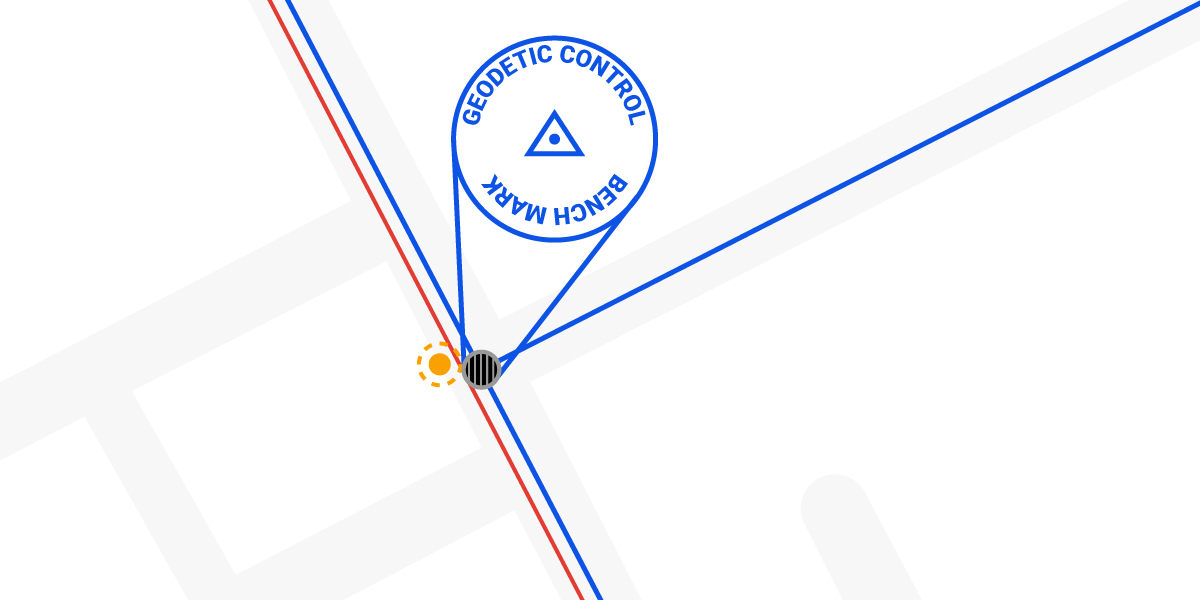
To fix this, you must apply a datum transformation from ETRS89 → WGS84 (or vice versa, depending on your project setup) inside your app or GIS software. After applying the transformation, your measured RTK points and the background map will align correctly.
Why Google Maps can show small offsets:
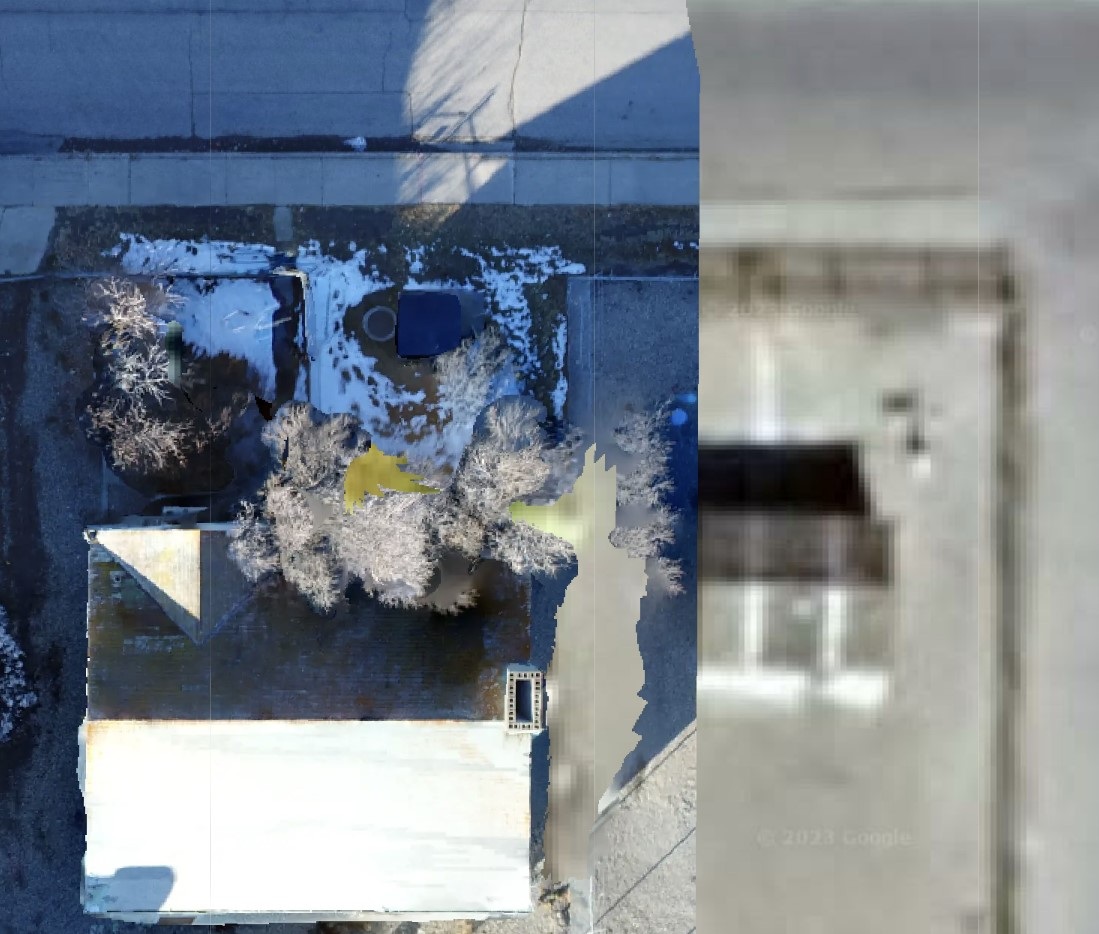
Google Maps is a special case worth mentioning. It is aligned to ITRF (very close to WGS84), but the imagery itself is not perfectly tied to that reference frame.
Each satellite image of Google Maps is processed and orthorectified separately, which introduces small residual shifts in pictures. Because of this, the visual layer can be offset by around 10–20 cm, sometimes more depending on the area.
So even if you correctly transform between ETRS89 and WGS84, you may still see a small mismatch between RTK-precise points and the Google Maps background image.
Using local RTK correction services
When you use an RTK receiver connected to a national correction network like SAPOS, the corrections are transmitted in the local reference frame — in Germany’s case, ETRS89. This is the official horizontal datum used across Europe for mapping, surveying, and GNSS applications.
However, ETRS89 isn’t just a datum — it also includes an epoch, which defines the moment in time the coordinates refer to. Because Europe moves slightly relative to the Earth’s center (about 2.5 cm per year), coordinates in ETRS89 are fixed to a specific time reference: ETRS89 at epoch 1989.0 (the time when Europe’s plate position was “frozen” relative to the global WGS84/ITRF system).
SAPOS broadcasts corrections in a realization of ETRS89 at epoch 1989.0, so: Your RTK positions are stable and consistent with national maps, even though the tectonic plate has moved since then.
You don’t need to apply any epoch transformation when comparing your SAPOS-based coordinates to official German cadastral or topographic data — they are all defined in the same reference frame.
This is one of the main advantages of using a local NTRIP service: it “translates” the global satellite data into your country’s local coordinate system in real time.
Using global correction service (Galileo HAS, PointPerfect, Skylark)
Imagine you’re designing a road project in AutoCAD, using your country’s official coordinate reference system — for example, ETRS89 / UTM zone 33N in Austria.
Later, your field team goes to stake out the design using a GNSS receiver connected to the Galileo HAS service, which provides corrections directly from satellites. For road construction, an accuracy of 20–40 cm is sufficient, so using HAS makes sense.
However, Galileo HAS broadcasts corrections in the global datum WGS84 (World Geodetic System 1984). Although WGS84 and ETRS89 are quite similar, their reference points differ by about 1–2 meters in Europe or even several meters elsewhere.
That’s why to ensure that your survey data, design drawings, and maps all align perfectly within the same reference frame, you must transform the design data from local datum ETRS89 to global WGS84 before sending it to the GNSS receiver.
Using correction service that sends RTCM 1021–1027 messages
In some countries, national correction services (like APOS in Austria, SatRef in Hong Kong) broadcast not only standard RTK correction data but also special RTCM 1021–1027 transformation messages.
These extra messages contain local coordinate transformation parameters — mathematical shifts that convert the global reference frame into the exact regional coordinate system.
This “local transformation” adjusts GNSS positions calculated in a global frame (like ITRF in case of APOS) to match the official national coordinate system used for mapping and surveying. It applies small translations, rotations, and scale corrections so that your coordinates align perfectly with local survey control points.
It’s important to note that this is not the same as using a regional datum like ETRS89. ETRS89 defines a stable reference frame for all of Europe, but each country can have its own local version (for example, ETRS89(AT) in Austria or ETRS89(PL) in Poland). RTCM 1021–1027 messages provide the extra step needed to fine-tune coordinates from that regional frame to your country’s exact local grid.
When your RTK receiver and field software support these messages, they can automatically output coordinates in the correct local grid — without you having to manually enter any datum or projection parameters.
Heights: ellipsoid vs. sea level vs. orthometric
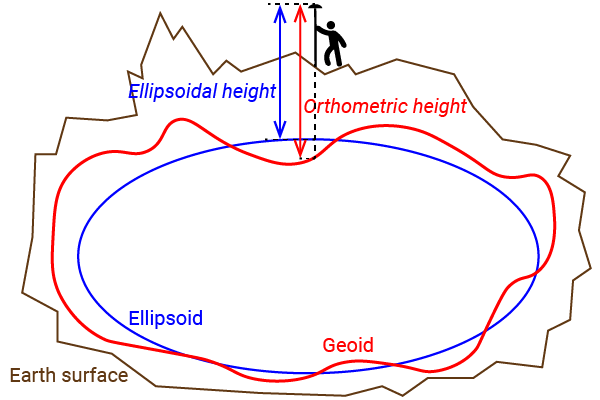
Another common challenge in GNSS positioning is understanding that not all “heights” are the same. GNSS receivers naturally output ellipsoidal heights, which are referenced to the WGS84 ellipsoid, not to sea level. However, many surveying applications rely on orthometric heights, which are based on mean sea level. This mismatch creates a key challenge: to compare or use elevation data consistently, you must convert between reference systems using a geoid model.
For a deeper explanation of ellipsoidal, orthometric, and geoid heights, check the The difference between Ellipsoidal, Orthometric, and Geoid height.
If you are looking for a proper Geoid model for your country , we’ve collected geoid data for different countries for you: Geoid model for your country to measure orthometric height.

RTK Assistant
Find the best products for your application in just a few questions.