
 and
and 

Use case 1:
U-center is not recognizing simpleRTK2B USB (aka the ZED-F9P is bricked) for any of the following reasons:
– Failure uploading the firmware (this usually doesn’t brick the ZED-F9P, but it may happen)
– Disabling all protocols for the USB port
– Uploading a wrong configuration of the ZED-F9P
– Changing the wrong setting in the configuration
Use case 2:
The user wants to connect UART1 to its computer but doesn’t have a FTDI adapter.
Problem:
If the board is bricked, it is not usable.
If USB connection for UART1 is needed, the user needs to buy an FTDI adapter.
Hack:
1) Remove all power from the board
2) Wire the board as shown in the below picture (you don’t need to solder the wires, just make sure the contact is ok)
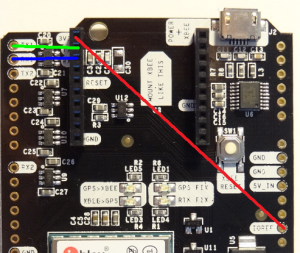
3) Connect the board to your PC via the POWER+XBEE micro USB
4) Run u-center and select the COM port
5) Go to View > Messages View > UBX > CFG > CFG and select Revert to default configuration, click Send
If you only needed to unbrick the ZED-F9P, that’s all!
If your firmware update failed, you can try again via UART1, it is much more stable than with the USB:
6) Go to UBX > CFG > PRT, set Target to UART2 and select for both Protocol in/out none
7) Upload the new firmware as always
When you are done, remove power and wires and use again the POWER+GPS USB.
If you plan to use regularly UART1 with the POWER+XBEE USB connector:
6) Go to UBX > CFG > PRT, set Target to UART2 and select for both Protocol in/out none
7) Go to UBX > CFG > CFG and select Save current configuration, click Send
Easy right?